
If your phone suddenly shows no bars, no service, or emergency calls only, you are not alone. Many users search for a trusted Jio SIM No Signal Fix when calls stop working, mobile data disappears, or SMS fails without warning. The good news is that most Jio network issues can be solved with a few simple checks, and this guide will help you restore signal quickly on Android or iPhone.
Why Is My Jio SIM Showing No Signal or No Service?
Before trying any Jio SIM No Signal Fix, it is important to understand why this problem happens. In many cases, the issue is not a dead SIM card. It may be caused by a temporary network outage, poor indoor coverage, incorrect mobile settings, software glitches, or even a loose SIM tray. Since Jio mainly works through 4G and 5G support, your phone also needs proper network registration for calls, internet, and SMS to work correctly.
Quick Overview Table for Jio SIM No Signal Fix
| Problem | Possible Reason | Best Fix |
|---|---|---|
| No signal bars | Temporary network glitch | Restart phone |
| No service | Jio outage or poor coverage | Check area network status |
| SIM detected but no network | Wrong preferred network mode | Set 4G/5G Auto |
| Calls not working | VoLTE disabled | Enable VoLTE |
| Weak signal indoors | Building blockage or low coverage | Move near a window or outside |
| SIM not reading properly | Loose or dusty SIM | Remove and reinsert SIM |
| Network issue after update | Software bug | Reset network settings |
| SIM fails in every phone | Damaged SIM card | Replace the SIM |
Related post: GP SIM 4G Internet Not Working? Frustrated? 15+ Fixes
1. Jio SIM No Signal Fix by Restarting Your Phone
The easiest Jio SIM No Signal Fix is restarting your phone. A reboot refreshes the network connection, clears temporary software problems, and forces the device to reconnect to the nearest Jio tower.
Follow these steps:
- Press and hold the power button
- Tap restart
- Wait for the phone to switch on completely
- Check whether signal bars return
This simple step often solves temporary signal loss without any advanced troubleshooting.
2. Jio SIM No Signal Fix by Turning Airplane Mode On and Off
Another effective Jio SIM No Signal Fix is toggling airplane mode. This disconnects your device from all wireless networks and then reconnects it cleanly.
Do this:
- Swipe down from the top of the screen
- Turn on airplane mode
- Wait 20 to 30 seconds
- Turn airplane mode off
- Allow the phone a minute to reconnect
This method is especially helpful when your phone gets stuck on a weak tower or fails to refresh the network after moving to another location. This method is especially helpful when your phone gets stuck on a weak tower or fails to refresh the network after moving to another location. You can also check basic Android network troubleshooting for more help.
3. Check for Jio Network Outage in Your Area
Sometimes the right Jio SIM No Signal Fix is simply confirming that the issue is not on your side. Jio tower maintenance, local service disruptions, or temporary outages can stop your SIM from getting network even when the card itself is fine.
You should:
- Ask nearby Jio users if they have the same problem
- Check Jio’s official support page
- Look at local outage reports or social media updates
- Wait a while and try again
If several nearby users are facing the same issue, then the problem is likely with the local network, not your phone. Ask nearby Jio users if they have the same problem and check Jio’s official support page for service updates and troubleshooting.
4. Jio SIM No Signal Fix by Reinserting the SIM Card Properly
A loose or dusty SIM can also lead to no service or unstable signal. That is why removing and reinserting the card is a useful Jio SIM No Signal Fix step.
Here is how:
- Turn off the phone
- Open the SIM tray carefully
- Remove the Jio SIM card
- Wipe away visible dust gently with a soft dry cloth
- Reinsert the SIM correctly
- Turn the phone back on
If the SIM is not seated properly, your phone may fail to register the network.
5. Test the Jio SIM in Another Phone
A smart Jio SIM No Signal Fix method is testing the same SIM in another compatible phone. This helps you understand whether the issue is with the SIM card or with your device.
Possible results:
- If the SIM works in another phone, your original phone may have a settings or hardware issue
- If the SIM does not work in another phone either, the problem may be with the SIM or Jio service
This step can save time and make troubleshooting much easier.
Read this: Robi SIM 4G Internet Not Working? 11 Easy Fixes That Work
6. Jio SIM No Signal Fix by Setting the Correct Network Type
The wrong network mode can stop your phone from connecting properly. Since Jio works mainly on 4G and 5G, setting the correct network type is an important Jio SIM No Signal Fix.
On Android:
- Open Settings
- Go to Mobile Network or SIM Settings
- Tap Preferred Network Type
- Choose 4G, LTE, or 5G Auto if available
On iPhone:
- Open Settings
- Tap Mobile Data
- Tap Mobile Data Options
- Open Voice and Data
- Choose 4G or 5G Auto
Avoid selecting older network modes manually, because Jio service performs best on modern settings.
7. Jio SIM No Signal Fix by Enabling VoLTE
If VoLTE is turned off, calls may fail even when data still works. On some phones, disabled VoLTE can also affect proper network behavior. So enabling it can be an important Jio SIM No Signal Fix.
To check:
- Open SIM or Mobile Network settings
- Look for VoLTE, LTE Calls, or HD Calling
- Turn it on if disabled
- Restart the phone once
After this, check whether calls and signal return to normal.
8. Improve Jio Signal Strength in an Open Area
Poor indoor coverage is one of the most common reasons people search for a Jio SIM No Signal Fix. Thick walls, basements, elevators, and remote indoor spots can weaken network reception.
Try these steps:
- Stand near a window
- Go outside the building
- Move to a higher floor
- Avoid underground or enclosed spaces
If the signal improves outside, the issue is likely weak coverage rather than a SIM problem.
9. Jio SIM No Signal Fix by Resetting Network Settings
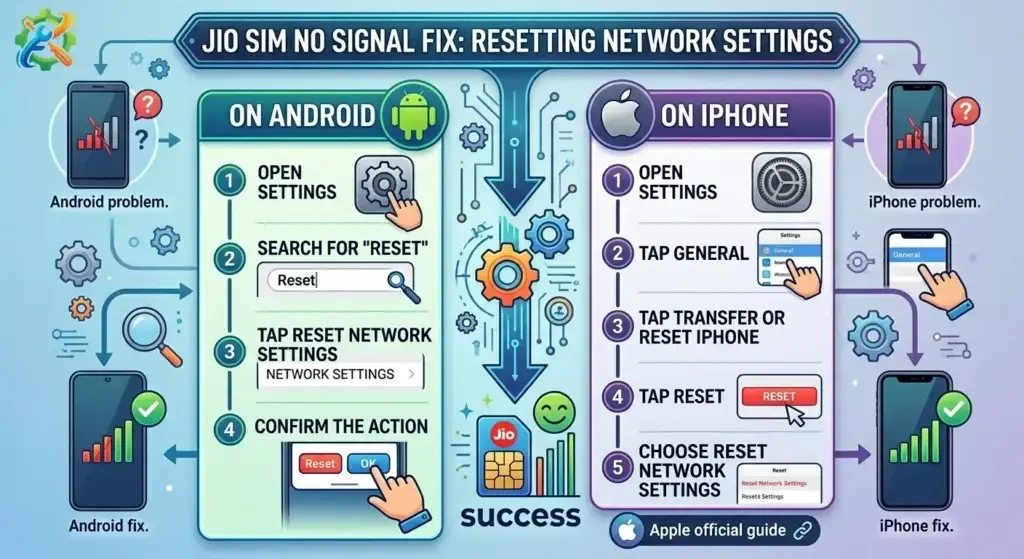
If the issue continues, resetting network settings is one of the most effective Jio SIM No Signal Fix methods. This clears saved mobile network settings that may be causing conflicts.
On Android:
- Open Settings
- Search for Reset
- Tap Reset Network Settings
- Confirm the action
On iPhone:
- Open Settings
- Tap General
- Tap Transfer or Reset iPhone
- Tap Reset
- Choose Reset Network Settings
After resetting, reconnect to the network and check again. If you are using an iPhone, you can also follow Apple’s official guide to confirm the exact reset network settings steps.
10. Update Your Phone Software to Fix Jio Network Bugs
Outdated software can cause mobile network bugs, SIM detection problems, and carrier compatibility issues. Installing the latest system update can be a reliable Jio SIM No Signal Fix.
To update:
- Go to Settings
- Tap Software Update or System Update
- Install any available update
- Restart your phone
Manufacturers often release network-related fixes through updates, so this step is worth trying.
11. Jio SIM No Signal Fix if the SIM Card Is Damaged
If none of the fixes work, the SIM card itself may be faulty. In that case, the best Jio SIM No Signal Fix is replacing the SIM.
Signs to watch for:
- SIM not detected
- No service in multiple phones
- Scratches on the SIM chip
- Frequent signal drops and reconnecting
If you notice these signs, visit a nearby Jio store and request a replacement SIM.
12. Contact Jio Customer Care for Jio SIM No Signal Fix Help
If every Jio SIM No Signal Fix method fails, the issue may be related to account provisioning, SIM registration, or a local network problem that only Jio support can confirm.
Before contacting support, keep these ready:
- Your Jio number
- Your location
- Your phone model
- The steps you already tried
This helps customer care understand the problem faster and offer a better solution. If none of the steps work, contact Jio customer care for account, SIM, or network help.
You can read: Nagad to bKash Send Money
Extra Tips to Prevent Jio SIM No Signal Fix Problems in the Future
Once your signal returns, a few simple habits can reduce the chance of needing another Jio SIM No Signal Fix later.
Keep Your Phone Updated for Better Jio SIM No Signal Fix Results
Install software updates regularly so your phone stays compatible with network and carrier settings.
Handle the Jio SIM Tray Carefully
Do not remove the SIM too often, and always make sure the tray closes correctly.
Use a 4G or 5G Compatible Smartphone
Older or unsupported phones may not handle Jio’s network features properly.
Turn On Wi-Fi Calling for Weak Jio Indoor Signal
If your indoor signal is weak, Wi-Fi calling can improve calling reliability in many places.
Common Mistakes to Avoid During Jio SIM No Signal Fix
When trying a Jio SIM No Signal Fix, many users make changes too quickly and create more confusion. Avoid these common mistakes.
Ignoring Jio Network Outage or Tower Issues
Sometimes the issue is with the local Jio network, not your device.
Skipping the SIM Test in Another Device
Testing the SIM in another phone is one of the fastest ways to identify the real cause.
Assuming the Jio SIM Is Dead Too Early
Weak coverage, software bugs, or wrong settings are often the real reason.
Resetting All Phone Settings Too Soon
Start with basic solutions first before moving to deeper fixes.
When Should You Replace Your Jio SIM Card?
You should consider a replacement if:
- The SIM is not detected in multiple phones
- The chip is visibly damaged
- Jio support confirms SIM-related issues
- The signal disappears again and again even after troubleshooting
In such cases, the most practical Jio SIM No Signal Fix is to get a fresh replacement SIM from an official Jio service center.
FAQ About Jio SIM No Signal Fix
1. What causes the need for a Jio SIM No Signal Fix?
This usually happens because of poor coverage, local outage, wrong network settings, software glitches, or a loose SIM card.
2. What is the fastest Jio SIM No Signal Fix method?
Restarting the phone and turning airplane mode on and off are usually the fastest first steps.
3. Can a damaged Jio SIM card cause no network?
Yes. A scratched or faulty SIM may fail to register on the Jio network.
4. Will resetting network settings delete my personal data?
No. It normally removes saved network settings only, not your photos, apps, or personal files.
5. Should I visit a Jio store if nothing works?
Yes. If all fixes fail, a Jio store can test the SIM and replace it if needed.
Conclusion: Best Jio SIM No Signal Fix Methods to Try First
A network problem can be frustrating, especially when you need calls, mobile data, or OTP messages urgently. Thankfully, most solutions are simple and can be done at home without technical help. This Jio SIM No Signal Fix guide covers the most useful methods, from restarting the phone and changing network mode to resetting settings and replacing the SIM if necessary. Follow the steps one by one, and in most cases, your Jio signal should return without major trouble.