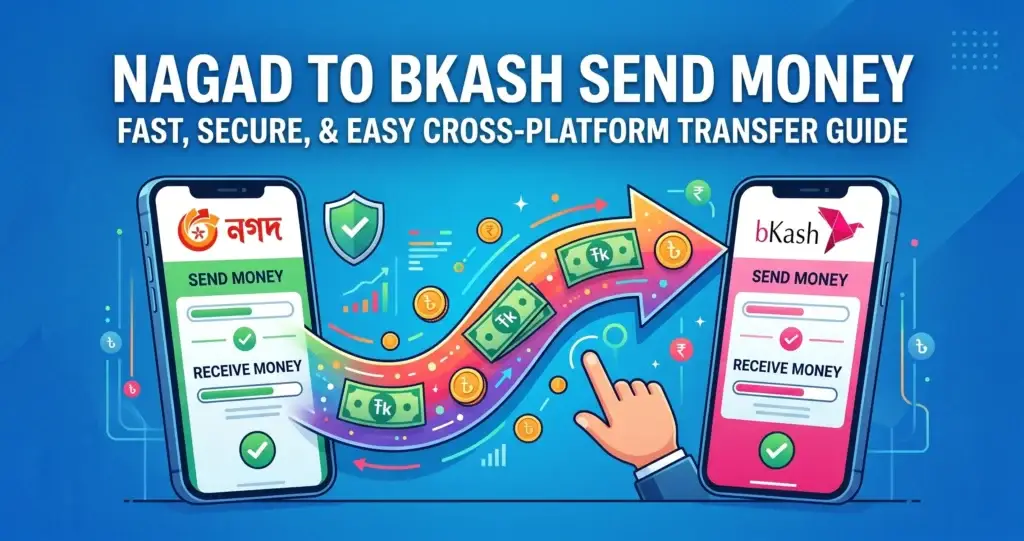
Mobile wallets dominate daily life in Bangladesh, yet sending money directly from Nagad to bKash remains a source of confusion for millions. With Bangladesh Bank’s push for interoperability, a direct Nagad to bKash Send Money option is now technically available—though not yet seamless for every user. This guide cuts through the noise, providing the exact steps, up-to-date fees, and critical workarounds you need to transfer funds smoothly in 2026.
How to Perform a Transfer from Nagad to bKash (Step-by-Step)
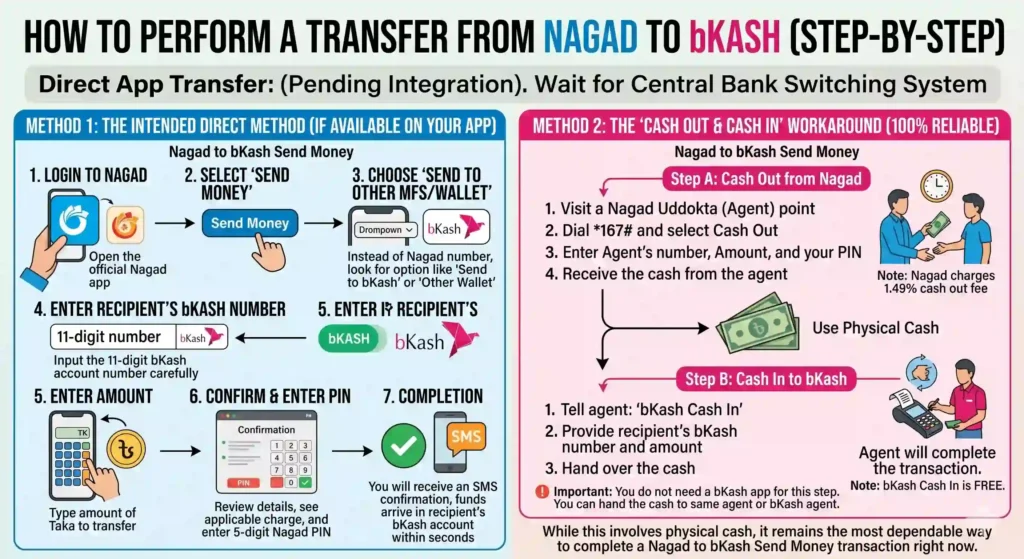
Due to Nagad’s ongoing integration process with the central bank’s switching system, the direct app-based method for a Nagad to bKash Send Money request is not yet universally available to all users. The system is designed for it, but implementation is pending.
Therefore, we must differentiate between the Intended Future Method (which some beta users might see) and the Current Reliable Method.
Method 1: The Intended Direct Method (If Available on Your App)
If Nagad has activated cross-platform sending for your account, you will see an option called “Send to Other MFS” or “Send to Bank/Wallet.” Here is how the Nagad to bKash Send Money process would work in that scenario:
- Login to Nagad: Open the official Nagad app (the blue icon, not the beige one).
- Select ‘Send Money’: On the home screen, tap the bright “Send Money” button.
- Choose ‘Send to Other MFS/Wallet’: This is the crucial step. Instead of selecting a Nagad number, look for an option that says “Send to bKash” or “Other Wallet.”
- Enter Recipient’s bKash Number: Input the 11-digit bKash account number (mobile number) carefully. This is the destination account for your Nagad to bKash Send Money transaction.
- Enter Amount: Type the amount of Taka you wish to transfer.
- Confirm & Enter PIN: Review the details. You will see the applicable charge. Confirm the request by entering your 5-digit Nagad PIN.
- Completion: You will receive an SMS confirmation, and the funds should arrive in the recipient’s bKash account within seconds.
Method 2: The “Cash Out & Cash In” Workaround (100% Reliable)
If the above option is missing or results in an error, this is the foolproof way to achieve a successful Nagad to bKash Send Money transfer.
Step A: Cash Out from Nagad
- Visit a Nagad Uddokta (Agent) point.
- Dial
*167#and select Cash Out. - Enter Agent’s number, Amount, and your PIN.
- Receive the cash from the agent. Note: Nagad charges 1.49% cash out fee.
Step B: Cash In to bKash
- Important: You do not need a bKash app for this step. You can hand the cash to the same agent (most serve both providers) or go to a bKash agent.
- Tell the agent: “bKash Cash In.”
- Provide the recipient’s bKash number and the amount.
- Hand over the cash. The agent will complete the transaction. Note: bKash Cash In is FREE.
While this involves physical cash, it remains the most dependable way to complete a Nagad to bKash Send Money transaction right now.
Related post: Bkash to Nagad Money Transfer: 2026 Fees & Limits
Fees and Charges for Nagad to bKash Send Money (2026 Update)
Understanding the cost of a Nagad to bKash Send Money transaction is vital. Here is the breakdown based on the method you use:
| Method | Fee Structure | Cost for Sending Tk 1,000 |
|---|---|---|
| Direct App Transfer | 0.85% (Capped by Bangladesh Bank) | Tk 8.50 |
| Cash Out (Nagad) + Cash In (bKash) | 1.49% (Nagad Cash Out) + Free (bKash Cash In) | Tk 14.90 |
Key Takeaway: The direct digital method is significantly cheaper (almost half the cost) compared to the agent-based workaround. This is why the nationwide push for interoperability is so important for consumers looking to do a Nagad to bKash Send Money transfer.
Latest Transaction Limits for Nagad to bKash Send Money
The Bangladesh Bank regularly revises these policies to balance convenience and security. As of April 2026, these are the limits for a Nagad to bKash Send Money transfer (P2P Category):
- Per Transaction Limit: Up to Tk 25,000 (Standard limit for MFS interoperability).
- Daily Limit: Tk 50,000 (Aggregate of all P2P sends from your Nagad account).
- Monthly Limit: Tk 300,000 (3 Lakh).
⚠️ Important Advisory on Temporary Restrictions:
During specific national events (such as general elections or major security operations), the central bank may impose temporary caps on digital transfers. Historically, these caps have lowered the per-transaction limit to Tk 1,000 and the daily limit to Tk 10,000. If you attempt a Nagad to bKash Send Money transfer during such a period and it fails due to “Limit Exceeded,” this is the likely cause. The restrictions are usually lifted within 7-10 days after the event concludes.
Nagad vs. bKash: Why Transfer Direction Matters
You might wonder, “Is there a difference between sending from Nagad to bKash versus bKash to Nagad?” Yes, there is.
| Feature | Nagad to bKash Send Money | bKash to Nagad Send Money |
|---|---|---|
| Sender Fee | 0.85% (via Nagad app) | 0.85% (via bKash app) |
| Cash Out Cost | Nagad Cash Out: 1.49% | bKash Cash Out: 1.85% |
| Common Use Case | Sending from Post Office-linked accounts. | Sending from Bank-linked accounts. |
If you are the sender, using the Nagad app is slightly cheaper on the cash-out side (1.49% vs 1.85%) if you have to resort to using an agent. This makes Nagad a marginally more cost-effective wallet to hold money in if you think you might need to perform a Nagad to bKash Send Money transfer later.
You can read: How to Fix bKash System Busy Problem 2026 (5 Easy Methods)
Troubleshooting: Why Did My Nagad to bKash Send Money Fail?
Encountering an error message during a Nagad to bKash Send Money attempt is frustrating. Here are the most common reasons and their immediate fixes:
1. The “Service Unavailable” or “Recipient Not Found” Error
- Reason: The bKash account number is correct, but Nagad’s system is not yet fully connected to the Interoperable Digital Platform (IDP) for that specific bKash account or region.
- Fix: Do not retry more than twice. Wait 30 minutes and try again. If it persists, you must use the Cash Out method. This is currently the most common issue with Nagad to bKash Send Money requests.
2. Amount Debited from Nagad but bKash Did Not Receive
- Reason: This is a “Timeout” error. Nagad’s system sent the request, debited you, but the confirmation signal from bKash’s switch was lost due to network latency.
- Fix: Check your Nagad Statement. Look for the transaction. If it says “Pending” or “Failed,” the money will automatically be reversed to your Nagad balance within 3-5 banking hours. If it says “Successful,” but bKash hasn’t received it, save the Transaction ID and call Nagad Support (Dial 16167).
3. Limit Exceeded Error
- Reason: You have hit the Tk 50,000 daily cap for Nagad to bKash Send Money or other P2P transfers.
- Fix: Wait until the next calendar day (after 12:00 AM) or use a different Nagad account.
5 Essential Safety Tips for Nagad to bKash Send Money
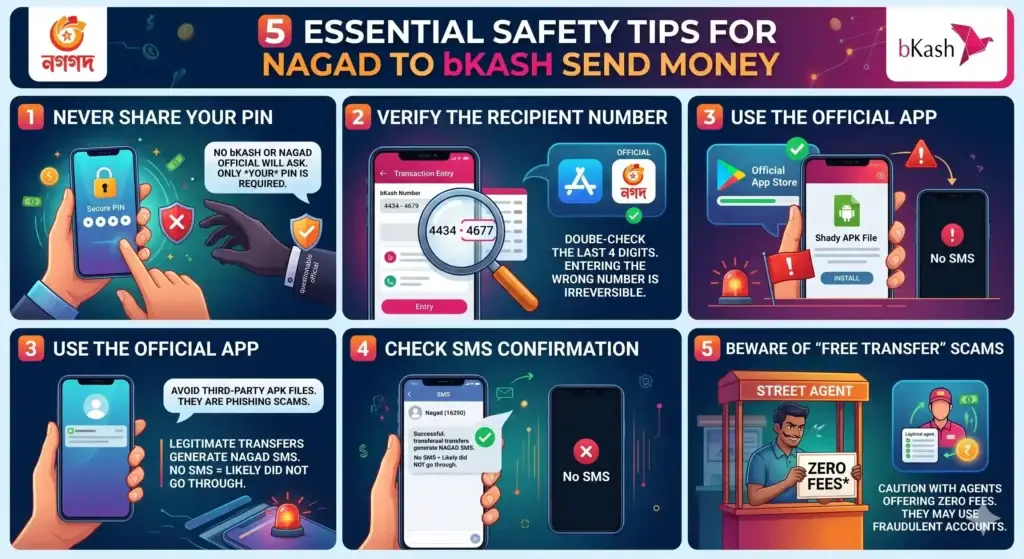
When dealing with a Nagad to bKash Send Money transaction, always adhere to these security practices:
- Never Share Your PIN: No bKash or Nagad official will ever ask for your PIN. The request only requires your PIN, not the recipient’s. For more details, review the official bKash security guidelines.
- Verify the Recipient Number: Entering the wrong bKash number during a Nagad to bKash Send Money transaction is irreversible in most cases. Double-check the last 4 digits before hitting confirm.
- Use the Official App: Avoid third-party APK files claiming to facilitate faster transfers. They are often phishing scams targeting Nagad to bKash Send Money users.
- Check SMS Confirmation: Legitimate transfers always generate an SMS from Nagad (
16290). If you do not receive an SMS, the Nagad to bKash Send Money transaction likely did not go through. - Beware of “Free Transfer” Scams: If an agent offers this service with zero fees, be cautious. They may be using fraudulent accounts or overcharging you elsewhere.
Also read this: How to Free Up Space in Google Photos on Android Easily
Frequently Asked Questions (FAQ)
Q1: Is Nagad to bKash Send Money possible directly from the app?
A: Yes, the feature is built into the Nagad app under “Send to Other MFS/Wallet.” However, due to system integration delays, it may not be available for all accounts or all bKash numbers yet. If you see the option, a Nagad to bKash Send Money transfer is possible. If not, you must use the agent cash-out method.
Q2: What is the exact charge for this type of transfer?
A: For direct app-based Nagad to bKash Send Money, the charge is 0.85% of the amount (Tk 8.50 per Tk 1,000). This is deducted from your Nagad balance.
Q3: How long does the transaction take?
A: A successful direct transfer is instantaneous (under 10 seconds). The agent cash-out and cash-in method takes about 2-5 minutes depending on the queue at the agent point.
Q4: Why can’t I send money from Nagad to bKash right now?
A: The most common reasons are: 1) Nagad’s link to the Interoperable Digital Platform (IDP) is still in pilot phase for your account. 2) The recipient’s bKash account is unverified or dormant. 3) Temporary network maintenance. Try a Nagad to bKash Send Money of a small amount like Tk 10 to test connectivity.
Q5: What is the maximum amount per day?
A: The daily limit for a Nagad to bKash Send Money transfer is Tk 50,000. This is the cumulative limit for all person-to-person transfers you make from Nagad in a single day.
Q6: Can I do this using the *167# USSD code?
A: Yes. Dial *167#, select Send Money, then look for Send to Other MFS/Bank. The process via USSD is similar to the app, but the app offers a more secure and visual confirmation.
Q7: Is this service free?
A: No. A Nagad to bKash Send Money transaction is not free. There is a government-regulated fee of 0.85% for the sender. There is no fee for the receiver.
Q8: What to do if money is deducted but bKash didn’t get it?
A: Do not panic. Note the Nagad Transaction ID. Wait for 3-5 hours. 99% of failed Nagad to bKash Send Money requests are auto-refunded. If not refunded within 24 hours, call Nagad helpline 16167.
Q9: Can I reverse the transaction if I sent it to the wrong number?
A: Unfortunately, no. Once a Nagad to bKash Send Money transfer is successful, it cannot be reversed by you or the agent. You must contact the recipient of that bKash number and request a return.
Q10: Does the recipient need to accept the money?
A: No. It is a “push” transaction. The money arrives in the recipient’s bKash account automatically. They just receive a notification SMS.
Conclusion
Mastering the Nagad to bKash Send Money process is an essential skill for anyone navigating Bangladesh’s digital economy in 2026. While full interoperability is still rolling out, this guide has equipped you with both the direct app-based approach and the reliable agent workaround. Understanding the exact fees, daily limits, and common troubleshooting steps ensures that your next Nagad to bKash Send Money transaction is both smooth and cost-effective.
The future of mobile financial services in Bangladesh is undeniably interconnected. As the central bank continues to refine the switching infrastructure, the friction currently associated with a Nagad to bKash Send Money request will diminish. Until then, by following the steps and safety protocols outlined above, you can confidently move your funds between these two dominant platforms. Keep your Nagad app updated, always verify recipient details, and you’ll be ready to leverage the full potential of a seamless Nagad to bKash Send Money experience the moment it becomes universally available.