If your robi sim 4g internet not working, you are not alone. Many users face this issue because of incorrect APN settings, weak network coverage, expired data packs, or device-related problems. In this guide, you will learn the most effective ways to fix robi sim 4g internet not working quickly and get your internet connection back without unnecessary confusion.
Why Is Robi SIM 4G Internet Not Working?
There can be several reasons behind robi sim 4g internet not working on your mobile phone. Sometimes the issue is very simple, such as mobile data being turned off accidentally. In other cases, the problem may come from a wrong network mode, outdated APN settings, SIM card damage, insufficient balance, or temporary network outage in your area.
Many people panic when the internet suddenly stops working, but in reality, this problem is often fixable within a few minutes. The best way to solve it is to check one thing at a time. That way, you can identify the actual cause instead of changing random settings and making the problem worse.
Another important thing to remember is that the issue may come from either your phone or the Robi network itself. So before blaming the SIM card directly, it is smart to test the common causes first.
How to Fix Robi SIM 4G Internet Not Working
When robi sim 4g internet not working, start with the easiest methods. In many cases, basic troubleshooting is enough to restore the 4G connection.
1. Check If Mobile Data Is On
The first thing you should do is confirm that mobile data is enabled on your phone. Sometimes users turn it off by mistake while changing settings or using battery saver mode.
Open your quick settings panel and check whether mobile data is on. If it is already enabled, turn it off for a few seconds and then turn it back on. This small refresh often helps the connection return.
2. Turn Airplane Mode On and Off
This is one of the fastest ways to refresh the network. Turn on airplane mode, wait around 15 to 20 seconds, and then turn it off again.
When robi sim 4g internet not working, this step can force the phone to reconnect to the nearest network tower. It is simple, but it often works surprisingly well.
3. Restart Your Phone
A phone restart clears temporary software bugs and refreshes the network connection. If your Robi internet was working earlier and suddenly stopped, a reboot can be the quickest solution.
Restarting also helps if your phone is lagging, overheating, or not detecting the network properly.
4. Check Your Internet Pack and Balance
Sometimes the real reason behind robi sim 4g internet not working is not technical at all. Your internet pack may have expired, or your available data may already be finished.
Check your active data balance from the Robi app or by using the relevant USSD code. If there is no active package, recharge and activate a valid internet offer before trying any advanced settings.
Related post: GP SIM 4G Internet Not Working? Frustrated? 15+ Fixes
Robi SIM 4G Internet Not Working Due to Weak Coverage
A poor signal is another common reason behind robi sim 4g internet not working. Even if your phone shows network bars, the internet speed may become extremely slow or completely unavailable in some places.
This usually happens in:
- basements
- elevators
- rural areas
- crowded buildings
- places with thick walls
Move to an open area or near a window and test the connection again. If the internet starts working there, then the problem is most likely related to coverage strength rather than your phone settings.
You can also ask someone nearby who uses Robi whether their mobile data is working. This helps you understand whether the issue is only on your number or affecting the whole area.
Change Network Mode If Robi SIM 4G Internet Not Working
A wrong network mode can stop 4G from working properly. If your phone is set to 2G or 3G only, then naturally you will not get Robi 4G internet.
1. Change Network Mode on Android
Go to:
Settings > Mobile Network > Preferred Network Type
Then choose one of these options, depending on your phone model:
- LTE/3G/2G Auto
- 4G/3G/2G Auto
- LTE Preferred
If your phone menu looks different, check this Android network settings guide.
2. Change Network Mode on iPhone
Go to:
Settings > Mobile Data > Mobile Data Options > Voice & Data
Then select:
- LTE
- or 4G
If the wrong network mode was causing the issue, this step may solve robi sim 4g internet not working immediately.
Reset APN If Robi SIM 4G Internet Not Working
APN settings are one of the most important things to check. APN means Access Point Name, and it tells your phone how to connect to the mobile internet network. If the APN is missing or incorrect, your SIM may show signal but the internet still will not work.
1. Correct Robi APN Settings
Use the following basic Robi APN information:
- Name: Robi Internet
- APN: internet
In most cases, you do not need to fill in the other fields manually.
2. How to Update APN on Android
Go to:
Settings > Mobile Network > Access Point Names
Then either edit the existing APN or create a new one. Save it and select it as the active APN.
3. How to Update APN on iPhone
Go to:
Settings > Mobile Data > Mobile Data Network
Then enter the APN value correctly and save the changes.
Incorrect APN settings are a major reason behind robi sim 4g internet not working, so do not skip this step.
Read More: How to Free Up Space in Google Photos on Android Easily
Check the SIM Card If Robi SIM 4G Internet Not Working
Sometimes the problem is with the physical SIM card itself. A loose SIM, dirty SIM surface, or damaged chip can prevent proper network access.
Turn off your phone, remove the SIM card carefully, clean it gently with a soft dry cloth, and insert it again. Then restart the device.
If your Robi SIM is very old, replacing it may also help. Older SIM cards may not perform as well as newer ones, especially for 4G service.
Test the SIM in Another Phone
This is one of the smartest troubleshooting methods. Put the same Robi SIM into another 4G-supported phone.
- If the internet works there, your own phone settings are likely the problem.
- If the internet still does not work, the SIM card or network service may be the cause.
This test gives you a much clearer idea of why robi sim 4g internet not working on your device.
Make Sure Your Phone Supports 4G Properly
Not every phone handles 4G equally well. Some older phones either do not support Robi’s 4G bands properly or have limited compatibility. This can lead to slow internet, unstable connection, or no 4G service at all.
Search your phone model online and check whether it fully supports 4G/LTE. Also confirm that your handset software is updated. Outdated software can sometimes interfere with mobile network performance.
When users ignore device compatibility, they often keep wondering why robi sim 4g internet not working even after trying basic fixes.
Also read: How to Fix bKash System Busy Problem 2026 (5 Easy Methods)
Reset Network Settings on Your Phone
If nothing works so far, reset your network settings. This step clears saved mobile network issues and restores the default connection settings.
Reset Network Settings on Android
Go to:
Settings > System > Reset Options > Reset Wi-Fi, Mobile & Bluetooth
Reset Network Settings on iPhone
Go to:
Settings > General > Transfer or Reset iPhone > Reset > Reset Network Settings
This will remove saved Wi-Fi passwords and Bluetooth connections, so keep that in mind. Still, it is a very effective solution when robi sim 4g internet not working because of hidden configuration errors.
iPhone users can also follow Apple’s official Apple network reset guide.
Update Your Phone Software
Phone software updates often include bug fixes related to connectivity, SIM detection, and network stability. If your system update is pending, install it and restart your phone.
Sometimes a temporary software issue is the reason behind robi sim 4g internet not working, especially after app conflicts or system glitches.
Keeping your phone updated helps maintain better performance, improved network stability, and smoother internet usage overall.
Contact Support If Robi SIM 4G Internet Not Working Still Continues
If you have tried all the methods above and your data still does not work, contact Robi support. Ask them to check whether:
- your SIM is fully 4G enabled
- there is a network problem in your area
- your number has any service restriction
- your data package is properly activated
For official help, you can visit Robi support resources.
When contacting support, explain the issue clearly and mention all the troubleshooting steps you already completed. This saves time and helps customer care guide you faster.
Tips to Prevent Robi 4G Internet Problems in the Future
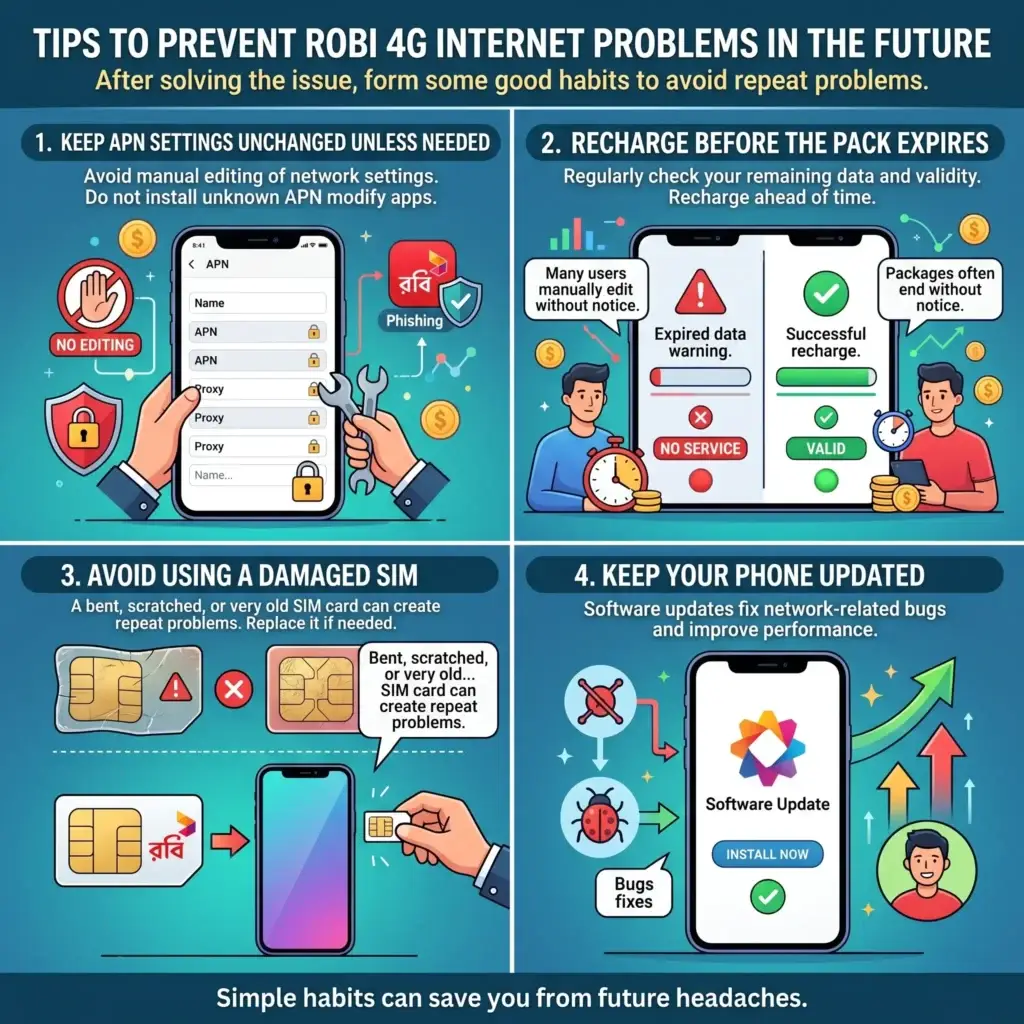
After solving the issue, it is smart toorm thes follow some habits that can reduce the chances of facing the same problem again.
1. Keep APN Settings Unchanged Unless Needed
Many users install random apps or manually edit network settings without understanding them. This can create internet problems later.
2. Recharge Before the Pack Expires
Internet packages often end without users noticing right away. Make it a habit to check your remaining data and validity regularly.
3. Avoid Using a Damaged SIM
A bent, scratched, or very old SIM card can create repeat problems. Replace it if needed.
4. Keep Your Phone Updated
Software updates help fix network-related bugs and improve performance.
Read this: Nagad to bKash Send Money: The Updated 2026 Guide
FAQ About Robi SIM 4G Internet Not Working
Why does my Robi SIM show signal but internet does not work?
This usually happens because of wrong APN settings, expired data package, network congestion, or a problem with your phone’s network mode. Even when signal bars appear, the internet may still fail if mobile data settings are incorrect.
1. Can wrong APN settings cause Robi SIM 4G internet not working?
Yes, absolutely. Wrong APN settings are one of the most common reasons behind robi sim 4g internet not working. Setting the correct APN as internet can often solve the issue quickly.
2. How do I know if my Robi internet pack has expired?
You can check your remaining data balance and package validity from the Robi app or by using the appropriate USSD code. If there is no active internet pack, mobile data may stop working.
3. Should I replace my SIM if Robi 4G is not working?
If your SIM card is very old, damaged, or not properly supporting 4G, replacing it is a good idea. A new SIM can improve connectivity and solve long-term network issues.
4. Can resetting network settings fix Robi SIM 4G internet not working?
Yes, in many cases it can. Resetting network settings removes corrupted connection data and restores the default mobile network configuration.
5. When should I contact Robi customer care?
You should contact Robi customer care if you have already checked mobile data, APN settings, signal coverage, internet pack, and SIM condition, but the issue still remains.
Conclusion
Facing robi sim 4g internet not working can be frustrating, but the good news is that the solution is usually simple. Start by checking mobile data, airplane mode, internet balance, and network coverage. Then move to important fixes like changing network mode, correcting APN settings, testing the SIM in another phone, and resetting network settings.
Most users can solve robi sim 4g internet not working without expert help by following these steps one by one. If the issue still continues, contacting Robi support or replacing the SIM is the best next step. A careful troubleshooting process will save your time and help you restore your internet connection faster.